To maximize your four years of study at VNU-USSH, please make the most of the facilities the university has provided for new students of the K69 cohort. These include the rich and valuable learning resources provided by the VNU-LIC Library and Digital Knowledge Center of the Vietnam National University, Hanoi.
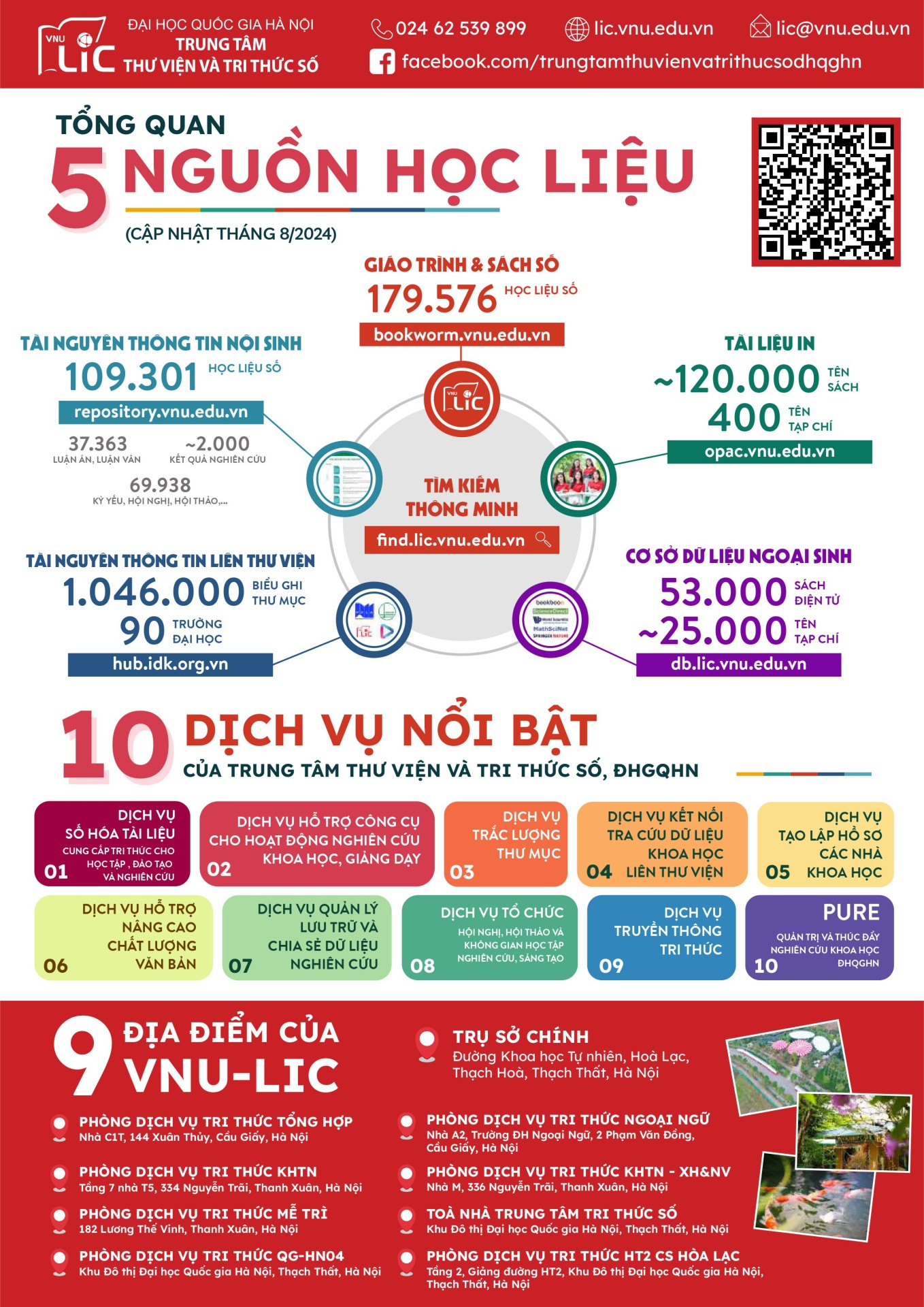
According to data updated as of August 2024, VNU-LIC has 179,576 digital textbooks and books; in terms of printed materials, there are 120,000 book titles and 400 journal titles; in terms of internally generated information resources, there are 109,301 digital learning materials; and in terms of externally generated databases, there are 53,000 e-books and 25,000 journal titles…
VNU-LIC's outstanding services currently include: document digitization services, services supporting tools for scientific research and teaching activities, bibliographic services, interlibrary data retrieval services, etc.
We invite you to visit the VNU-LIC Library and Digital Knowledge Center for students of the University of Social Sciences and Humanities at the following address: Knowledge Services Room, Building M, 336 Nguyen Trai Street, Thanh Xuan District, Hanoi, as well as 8 other VNU-LIC locations at member universities of Vietnam National University, Hanoi.
New students, please familiarize yourselves with the Library and Digital Knowledge Center's User Guide to best support your studies and research during your time at VNU-USSH!
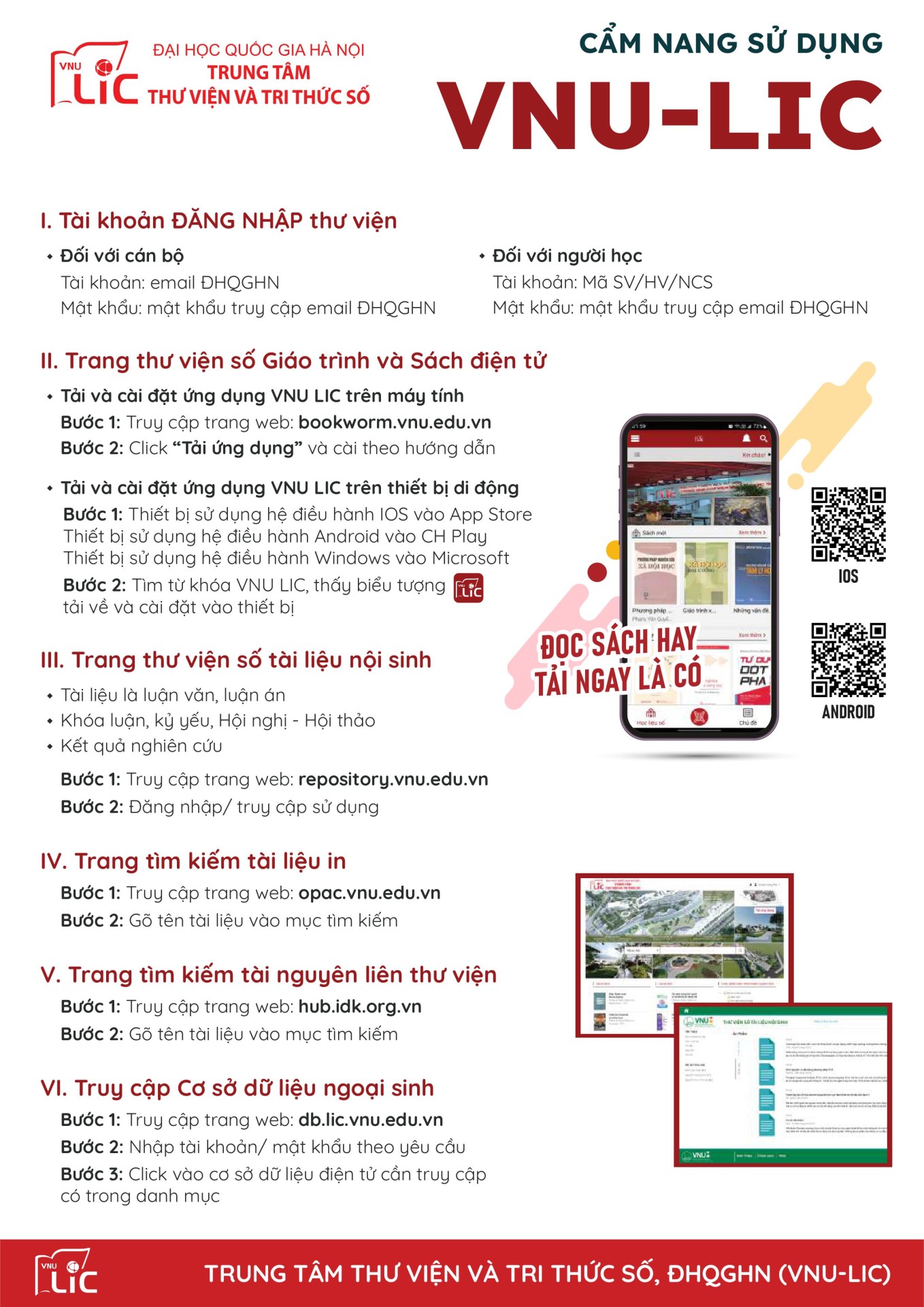
1. Library LOGIN account
- For staff:Account: VNU email
Password: the password to access the VNU email
- For learners:Account: Student ID/Learner ID/Postgraduate Student ID
Password: the password to access the VNU email
2. Digital Library Page for Textbooks and E-books- Download and install the VNU LIC application on your computer.
Step 1: Access the website:
bookworm.vnu.edu.vnStep 2: Click “
Download the app" and install according to the instructions
- Download and install the VNU LIC application on your mobile device.
Step 1: For devices using the iOS operating system, go to the App Store.
Devices using the Android operating system can access the Google Play Store.
Devices using the Windows operating system from Microsoft.
Step 2: Search for the keyword VNU LIC, find the download icon, and install it on your device.
3. Digital library page for internally generated documents- The document is a thesis or dissertation.
- Theses, proceedings, conferences - seminars
- Research results
Step 1: Access the website:
repository.vnu.edu.vnStep 2: Log in/access the service.
4. Print document search page- Step 1: Access the website: opac.vnu.edu.vn
- Step 2: Type the document name into the search box.
5. Interlibrary resource search page- Step 1: Access the website: hub.idk.org.vn
- Step 2: Type the document name into the search box.
6. Accessing Exogenous Databases- Step 1: Access the website: db.lic.vnu.edu.vn
- Step 2: Enter your username/password as requested.
- Step 3: Click on the electronic database you want to access from the list.